
Yatra- Flight Web Check-In1.1.1 - Google Play
You'll be able to see results in few seconds.
Publisher Description
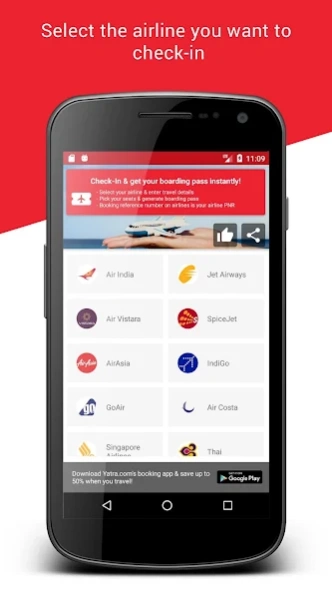
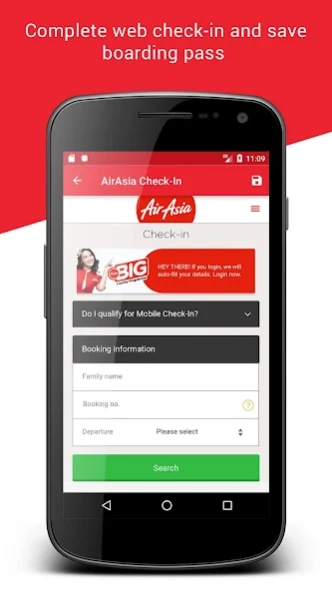
Complete your flight check-in, select preferred seats & get your boarding pass
Yatra.com brings another travel utility app to ease your travel experience.
This app allows you to complete flight web check-in for all domestic flights, block your preferred seats & get your boarding pass in advance
- Complete your web check-in for all domestic flights - Air Asia, Air India, SpiceJet, Indigo, Vistara, Jet Airways, Go Air
- No matter from where you have booked the flight, you can complete web check-in using this app
- Save time by skipping long queues at the airport
- Block your preferred seats in advance rather than choosing from left over ones
- Print and carry your boarding pass to the airport
- Check-in from the comfort of your home or on the move
- No Login required
Process of checking in using Yatra Flight Web Check-In app:
Step 1 - Select your Airline
Step 2 - Enter your PNR & other booking details as needed by the Airline
Step 3 - Pick your preferred seats from the available ones
Step 4 - Save, download & print you boarding pass
Important things about Yatra Flight Web Check-In app:
- It’s absolutely free of cost
- You do not need to be logged in or provide any personal info to use this app
app
- We’ll not bother you with those annoying advertisements
- You can check to any of the supported airlines – Air Asia, Air India, SpiceJet, Indigo, Vistara, Jet Airways, Go Air
Happy Checking-In!
We are continuously improving, and hence your feedback will be very useful. So please send bugs, feature-requests & thoughts to apps@yatra.com
About Yatra- Flight Web Check-In
The company that develops Yatra- Flight Web Check-In is Yatra.com- Flight, Hotel, IRCTC Authorized Partner. The latest version released by its developer is 1.1.1.
To install Yatra- Flight Web Check-In on your Android device, just click the green Continue To App button above to start the installation process. The app is listed on our website since 2017-11-19 and was downloaded 0 times. We have already checked if the download link is safe, however for your own protection we recommend that you scan the downloaded app with your antivirus. Your antivirus may detect the Yatra- Flight Web Check-In as malware as malware if the download link to com.yatra.webcheckin is broken.
How to install Yatra- Flight Web Check-In on your Android device:
- Click on the Continue To App button on our website. This will redirect you to Google Play.
- Once the Yatra- Flight Web Check-In is shown in the Google Play listing of your Android device, you can start its download and installation. Tap on the Install button located below the search bar and to the right of the app icon.
- A pop-up window with the permissions required by Yatra- Flight Web Check-In will be shown. Click on Accept to continue the process.
- Yatra- Flight Web Check-In will be downloaded onto your device, displaying a progress. Once the download completes, the installation will start and you'll get a notification after the installation is finished.
Program Details
General
System requirements
Download information
Pricing
Version History
version 1.1.1
posted on 2017-11-19
- We have added more airlines to assist our users with on-boarding
- UI enhancements
- Bug fixes
version 1.1.1
posted on 2017-11-20
- We have added more airlines to assist our users with on-boarding
- UI enhancements
- Bug fixes
version 1.1.0
posted on 2017-01-19
Introducing the all new Yatra Web Check-In App.,Experience our brand new identity with the latest update.
version 1.0.4
posted on 2016-04-01
- Bug fixes and improvements
Disclaimer
Official Google Play Link
We do not host Yatra- Flight Web Check-In on our servers. We did not scan it for viruses, adware, spyware or other type of malware. This app is hosted by Google and passed their terms and conditions to be listed there. We recommend caution when installing it.
The Google Play link for Yatra- Flight Web Check-In is provided to you by apps112.com without any warranties, representations or guarantees of any kind, so access it at your own risk.
If you have questions regarding this particular app contact the publisher directly. For questions about the functionalities of apps112.com contact us.
